
Consent Phishing in Microsoft 365: How It Works & How to Prevent It

Updated: Dec 19, 2025
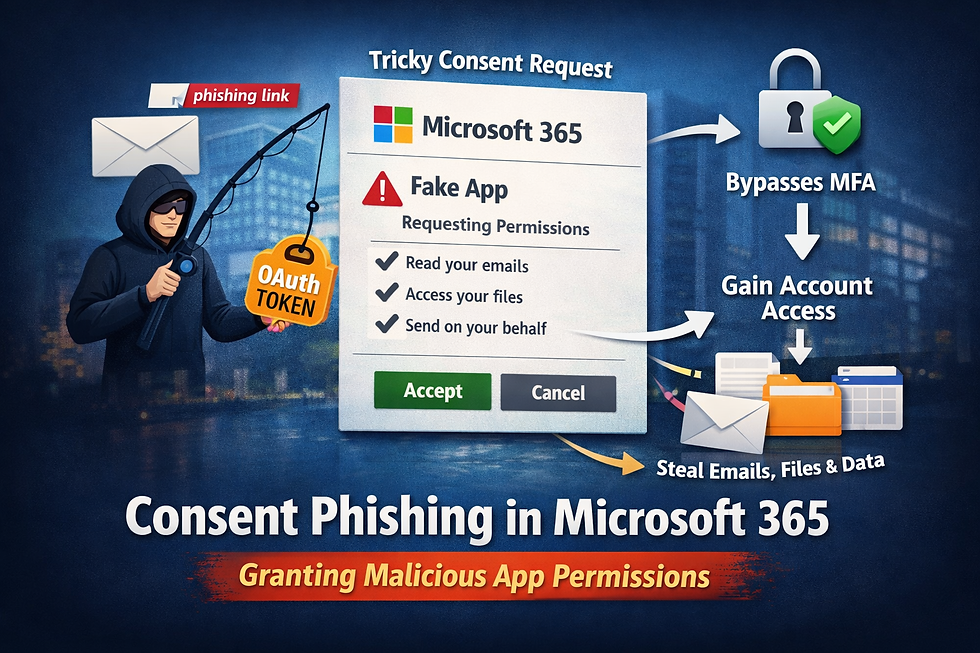
Consent phishing in Microsoft 365 is when an attacker tricks a user into granting a malicious application access via OAuth (Open Authorization) instead of stealing a password. The fake app presents a consent screen requesting risky scopes. Once approved, the attacker gets long-lived token access through a service principal—often bypassing MFA.
Quick definition
Consent phishing—also called an illicit consent grant—is when an attacker gains access without stealing a password by persuading a user to approve a malicious application. The app’s OAuth (Open Authorization) consent screen asks for scopes (permissions). If the user clicks Accept, Microsoft Entra ID (formerly Azure AD) creates or uses a service principal and issues tokens that can grant access to data like mail, files, or calendars.
How this differs from password phishing:
Password phishing targets credentials and is blocked by stronger authentication.
Consent phishing targets application authorization, so even accounts with MFA (multi-factor authentication) can be exposed if the user approves the wrong app.
What to do next: Align your team on this definition so help desk, security, and leadership share the same mental model.
How consent phishing works
The attacker’s playbook
Fake app is prepared. The attacker registers an app (sometimes with a convincing name and icon).
Misleading consent screen. A link drives the user to a familiar Microsoft-hosted prompt asking the user to grant permissions.
Risky OAuth scopes. The app requests scopes like reading mail, accessing files, or sending as the user.
Long-lived access. Once approved, the app gets tokens—and often refresh tokens—tied to a service principal, enabling ongoing access without repeated prompts.
A key reason this attack works: the user often sees a legitimate-looking Microsoft consent UI, and the attacker frames the request as normal (“connect your calendar,” “enable e-sign,” “sync your CRM,” etc.). In reality, the requested scopes can be far broader than the business purpose.
Why it bypasses passwords and MFA
OAuth allows token-based access after the user authorizes an app. That means the attacker does not need the user’s password, and MFA on sign-in doesn’t help if the authorization decision was the weak link. The app acts with the permissions granted—quietly—until someone notices.
This is why “we have MFA” is not a complete defense against Microsoft 365 / Entra ID connected apps (OAuth) risk. If an employee authorizes a malicious app, the attacker can gain access through tokens even though the user never typed a password into a fake website.
What to do next: Review where and how consent can happen in your tenant(s) and who is allowed to approve it.
Want the step-by-step? Download the OAuth Security Checklist to get the procedures and reviewer prompts. Get the Checklist: https://appguard360.com/resources/oauth-security-checklist
Prevention essentials
Your goal is to raise the bar before consent is granted and make risky consents stand out.
User consent settings & Admin consent workflow
Restrict user consent so employees can’t approve high-risk scopes by default.
Use the Admin consent workflow to route requests to reviewers who can validate the business need.
Keep approvals and rejections documented for audit.
In practice, this means shifting consent decisions from “whoever clicked the link” to a controlled review step. Reviewers should confirm:
the requester and sponsor are real,
the app purpose is legitimate,
the scopes match the stated purpose,
the app is from an expected publisher,
the request is time-bound when possible.
What to do next: Decide which business units truly need user-driven consent and enable the Admin workflow everywhere else.
Application consent policies & Verified Publisher
Application consent policies let you define which apps (or scopes) are allowed or require admin review.
Require Verified Publisher where practical. A Verified Publisher means the app publisher’s domain is validated—it does not mean the app is safe by default, but it reduces anonymous/throwaway submissions.
A useful mental model: Verified Publisher is a trust signal, not a safety guarantee. You still need to review scopes, tenant impact, and who requested the app.
What to do next: Create policy tiers (e.g., low/medium/high risk) and map them to routes in your Admin consent workflow.
Least-privilege scopes and continuous monitoring
Encourage teams to ask for only the scopes they need, and to revisit broad consents periodically.
Monitor enterprise apps and service principals for new grants, new owners, or sudden scope changes.
Keep a review cadence (monthly/quarterly) with evidence retained.
The “least privilege” part is straightforward, but enforcing it requires operational discipline. Most tenants accumulate dozens (or hundreds) of OAuth grants over time—many created during projects that are long gone. If you don’t track ownership and purpose, your tenant becomes a graveyard of “still authorized” access.
What to do next: Establish a simple intake template that forces requesters to justify each scope in plain English.
Detection & incident response
If you suspect a malicious consent, treat it like an authorization breach. Keep your playbook high-signal and repeatable.
Discover suspicious apps and service principals
Look for recently added apps, unfamiliar publishers, and unusual scope sets.
Prioritize apps with delegated scopes to sensitive data (e.g., mail, files) or application permissions that skip user context.
Check who can consent and whether this was a user or admin grant.
A practical starting point is to focus on:
new apps added in the last 7–30 days,
apps with mail/file send/read scopes,
apps with tenant-wide permissions,
apps with missing/unclear ownership,
apps with changes to owners or permissions.
What to do next: Stand up a saved view that flags new apps, high-risk scopes, and changes to owners.
Prioritize triage with a simple score
If you’re doing this manually, build a lightweight scoring model using:
Scope criticality (mail/file/send vs basic profile),
Publisher trust (verified vs unknown),
Data exposure (which workloads it can reach),
Tenant-wide impact (single user vs broad application permissions).
Sort by score and triage from highest-risk down. The objective isn’t perfection—it’s speed and consistency.
Review scopes, owners, and activity
Read each scope in plain language: what can this app see or do?
Validate business owner and purpose; confirm the app is still required.
Look for recent token activity aligned to risky actions.
Where teams get stuck is “we don’t know if it’s legit.” Your goal isn’t to become an app developer—it’s to answer three questions quickly:
Is this app supposed to exist? (owner + business purpose)
Is it asking for more than it needs? (scope review)
Is it behaving unusually? (activity review)
What to do next: Require a business owner to confirm purpose and timeframe for any app keeping high-risk scopes.
Revoke tokens, remove apps, notify users, retain evidence
Revoke refresh/access tokens for the app; remove the service principal if not needed.
Notify affected users and rotate any credentials/secrets the app touched.
Retain evidence—exports, screenshots, and approvals—for audit and post-incident review.
Run a containment pilot first (limited scope/time window), with a rollback plan.
Be cautious with “rip and replace” in production. Some third-party apps are business-critical. When you suspect malicious consent, move fast—but use a method:
contain access (revoke tokens),
validate business impact,
remove or remediate,
document decisions and evidence.
What to do next: Keep a shelf-ready IR checklist so responders follow the same steps every time.
Related risks you should track next
Risky OAuth scopes. Not all scopes are equal. Mail and file access, sending as a user, or full-tenant application permissions have outsized blast radius.
See our overview of OAuth app risks in Microsoft 365: https://appguard360.com/resources/oauth-app-risks-microsoft-365
Abandoned webhooks. Webhooks (including Microsoft Graph subscriptions) can linger after a project ends. If no one owns them, they can fail silently or point at the wrong endpoint. Clean them up with the same See → Understand → Fix approach.
Learn more: https://appguard360.com/blog/abandoned-webhooks
What to do next: Add both items to your quarterly review checklist alongside app consent reviews.
Summary and next steps
Consent phishing shifts the weak point from sign-in to authorization. You prevent impact by controlling who can consent, which scopes are allowed, and how quickly you see and understand new grants so you can fix the risky ones. For step-by-steps, use the checklist; for speed and evidence, consider automation.
What to do next: Start with a one-week discovery sprint, enable Admin consent workflow, and establish a monthly review—then pilot enforcement.
Summary and next steps
Consent phishing shifts the weak point from sign-in to authorization. You prevent impact by controlling who can consent, which scopes are allowed, and how quickly you see and understand new grants so you can fix the risky ones. For step-by-steps, use the checklist; for speed and evidence, consider automation.
What to do next: Start with a one-week discovery sprint, enable Admin consent workflow, and establish a monthly review—then pilot enforcement.
Resources:
(Note: AppGuard360 is single-tenant SaaS—your data and automations run in a tenant dedicated to you.)
Mini-FAQ (People Also Ask)
Does MFA stop consent phishing in Microsoft 365?
Not directly. MFA protects sign-in. Consent phishing exploits authorization—users grant an app permissions. If the consent is approved, tokens can be issued without capturing the user’s password.
How do I know which OAuth scopes are risky?
Prioritize scopes that read or send mail, access files across drives, read all calendars, or grant application-level (tenant-wide) access. Keep a short, plain-English tiering and review it quarterly.
Where do malicious apps show up in Microsoft 365?
In your tenant’s enterprise applications and service principals. Look for new apps, unknown publishers, broad scopes, and unusual owners.
What’s the role of Verified Publisher?
It confirms the publisher controls the stated domain, which reduces drive-by submissions. It isn’t a safety guarantee—still review scopes and purpose.
What is an Application consent policy? A tenant control that lets you allow, block, or require admin review for app consents based on conditions like publisher or requested scopes.


Comments